Freeze Frame

Freeze Frame
License:
Trial version
Language:
English
Developer:
OS:
Mac OS X
Added:
See detailed info

Softonic review

Cyril Roger

“Freeze any application at once”

by Cyril Roger about Freeze Frame

You know how you sometimes want to focus all your CPU power on one application? In this case it's often best to shut down all other running processes, so your Mac can use all its processor speed for that one task.

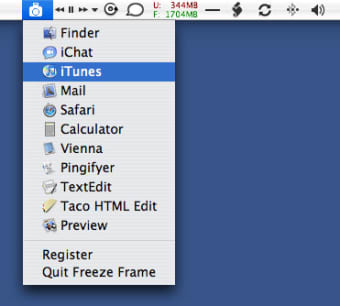
Freeze Frame allows you to keep all your applications open yet freezes the ones you don't want to use. They'll still be open but will not use up any of the CPU power, giving you better performances on the application left running. The program is easily accessible from the menu bar, and all you have to do is select the program in the drop down list to freeze it. Clicking it again will unfreeze it.

The program also includes a 'focus freeze' feature, which is even more handy. This essentially freezes every process except the frontmost one on your screen.

If your Mac is powerful enough, you probably won't need to use a program like Freeze Frame. For weaker machines, the solution can also be to open only the programs you need. If you can't work without having multiple applications open though, Freeze Frame is the right solution to enhance CPU power.

Freeze Frame freezes all the selected applications on your Mac, so you can use your CPU power to focus on one.

Pros
  • Focus Freeze
  • Accessible from menu bar
Cons
  • Not necessary if you're Mac is powerful enough
Download Freeze Frame 1.1.2

Freeze Frame is virus free

We have analyzed the latest version of Freeze Frame with 30 antivirus engines and it is virus free. See analysis results.

TESTED VIRUS FREE - Softonic GUARANTEED

Developer's description

Using the underlying UNIX power of Mac OS X, Freeze Frame allows you to completely freeze any application, making it use absolutely no CPU cycles.

Because arranging loops in GarageBand or applying a filter in Photoshop, for example, requires as much CPU power as your Mac can muster. While you attempt these kinds of CPU intense operations, you may have several other applications open that are also demanding attention. Freeze Frame can freeze them and allow your Mac to concentrate on the task at hand.

This means the next time you're applying a filter in Photoshop and Mail decides it needs to update right now, you can freeze Mail in it's tracks. Photoshop can then run it's process uninterrupted.

Review and rate Freeze Frame

Your avatar

Your opinion is important.
Help other users - be the first to review this program.

Review
  1. Maximum: 75 characters

  2. See example

Pros and Cons
Rate
  1. What rating would you give Freeze Frame?

    You need to fill in all fields

    • Usability:

      Not rated
    • Stability:

      Not rated
    • Installation:

      Not rated
    • Functionality:

      Not rated
    • Appearance:

      Not rated
    • Overall rating:

      Not rated
  2. Don't worry, we won't make your email address public.

You're not allowed to share serial numbers, cracks, etc. or link to pages that contain them. If you do, your user account will be deleted, your IP address logged and legal action will be taken.

Get started - just ask a question!

Write a title for your question.

Alternativesto Freeze Frame

  • In English:
    Maintain1
    Maintain1

    Launch more than 250 shell scripts in your terminal

    Softonic rating:
    • 8/10
    User rating:
    • 3/10
  • Free:
    SMARTReporter
    SMARTReporter

    Quickly detect errors in your hard drive

    Softonic rating:
    • 8/10
    User rating:
    • 10/10
Compare with Freeze Frame
Download rank: Analisers & Optimizers

35 of 65

Softonic rating:
  • Good
  • 7/10
Your rating:
Your rating
  • 0

Review and rate this program

Top Downloads: Analisers & Optimizers

  • United States
  • Global

  1. Defrag and optimize your hard disk with ease

Reviews of Freeze Frame in other languages